Project Overview
In this project, I created a Snapchat filter using Lens Studio, which brings iconic League of Legends emotes into an interactive AR experience. The filter allows users to wear the emotes on their face, enhancing the Snapchat experience with a fun, gaming-related touch.
Objective
The goal was to create a simple, engaging 2D filter that allows users to transform their Snapchat experience with the use of League of Legends emotes, popular within the gaming community. The challenge was to take static emote images from the game and integrate them seamlessly into Snapchat’s AR platform.
Process
Create a new project and pick Snapchat
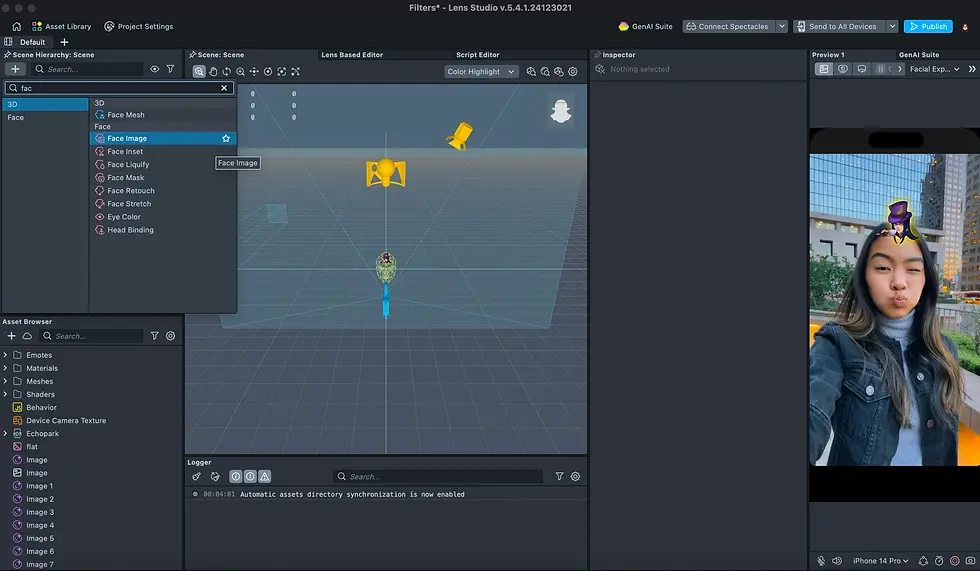
On the top-left side, click the plus sign under the Scene Hierarchy tab and click Face Image from the options
Dont forget to upload png's of the emotes at the bottom left side, under the Asset Browser tab!
Under the Face Image layer, an image layer will appear underneath it. Click on it and drag the png on to the right side under the Texture tab
And that's it! You can now adjust scale, proportion, and blending modes after. You can also clip the emote on a specific part of the face. For this project I've clipped it on the forehead.
Check out the other emotes that I've done here!




Comments